Stop motion product effect turns a static packshot into a sequence where the product appears to hop, walk, roll, or build its own set. It is a practical ad style for small brands because a phone, a fixed camera position, and a handful of deliberate movements can create a playful visual story.
The simplest method is to lock your phone, move one object a small distance between photos, and join the frames into a short loop. Keep the product’s size, lighting, and orientation consistent. Change only one thing per frame, and choose an action that demonstrates a benefit or personality.
Why does the stop motion product effect work?
It works because each movement gives the viewer an easy visual question: where will the product go next? The answer arrives almost immediately, so the sequence feels active without requiring a cast, a location, or a complicated camera move.
A useful sequence also turns motion into meaning. A serum climbing upward can suggest a morning routine. A shoe stepping across paper can imply grip and movement. A drink rolling through citrus can foreground flavor. The prop should clarify the product story rather than merely decorate the frame.
Stop motion is also modular. You can publish the loop as a short ad, pull one clean frame for a product card, or swap the opening frame to test a different hook. For more ways to vary the same material, use this guide to make product video ad variations from one shoot.
4 stop motion product effect looks to try
1. The plinth hop
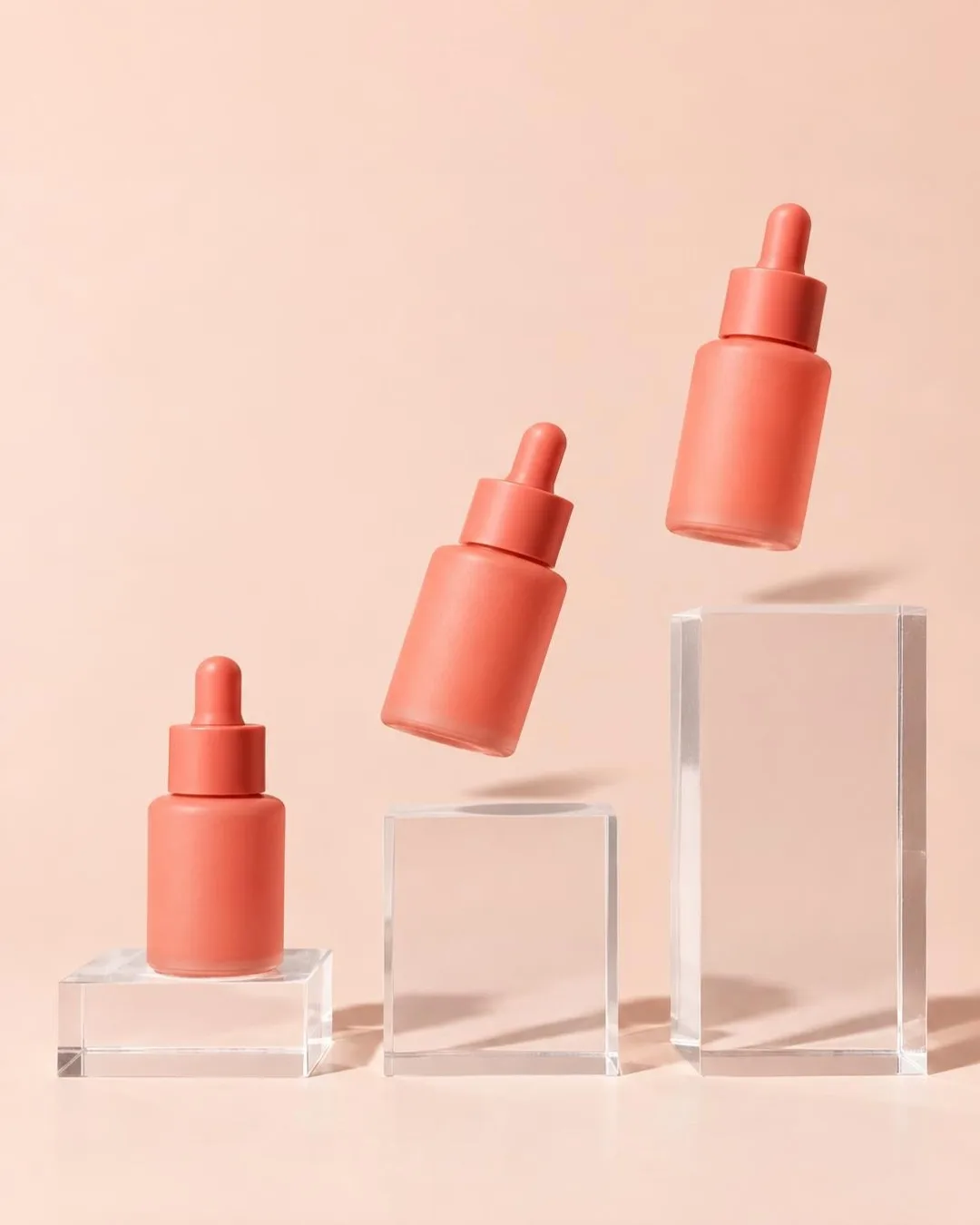
Place three blocks at different heights against one plain background. Photograph the item on the lowest block, move it to the middle, then finish at the top. Add an in-between frame with the product slightly lifted if you want the hop to feel springy.
This look suits skincare, fragrance, candles, and compact accessories. Keep labels facing the same direction and mark each block position with removable tape outside the crop.
2. The paper walk

Fold colored card into waves, stairs, or low arches, then move the product across one prop at a time. For a shoe, alternate toe-up and flat positions to suggest a stride. For a bag, shift the handle or strap slightly as the body advances.
Limit the palette to two or three colors. Too many patterns compete with the small positional changes that create the animation.
3. The ingredient roll

Arrange ingredients in a loose path and rotate the package a little between frames. A beverage can can roll through lemons; a balm can slide past cherries; a coffee pouch can travel between beans. Use large props, because tiny scattered pieces can flicker when the sequence plays quickly.
Before shooting, check that every ingredient accurately represents the product. A beautiful but misleading prop weakens the story.
4. The assembling pedestal

Start with an empty surface and introduce one translucent block per frame until the pedestal is complete. Place the product in the final frames, or keep it fixed while the structure assembles below. Side light helps separate clear materials from the background.
This controlled look works well for electronics, jewelry, watches, and small design objects. Keep reflections simple so they do not jump unpredictably between frames.
How do you make a stop motion product effect on a phone?
You make it by fixing the camera, planning one movement, and photographing a series of small changes. Consistency matters more than frame count.
- Choose one action: hop, slide, roll, stack, open, or reveal.
- Lock the phone: use a tripod or stable clamp and do not pinch-zoom after the first frame.
- Fix the exposure: avoid changing window light, and lock focus and brightness when your camera allows it.
- Mark positions: place small tape marks outside the crop for the product and props.
- Shoot the sequence: move one element a small, repeatable distance between photos.
- Check continuity: compare the first, middle, and final frames for scale, label direction, shadows, and accidental bumps.
- Build the loop: arrange the images in order, set a steady pace, and test whether the final frame returns naturally to the first.
If you prefer generating motion from a product photo instead of photographing every frame, you can turn a product photo into an AI product video in Prodvid. Prodvid is our iPhone app for AI product video ads; review the generated product shape, label, shadows, and motion before publishing.
Production tips for a cleaner stop motion product effect
Use this copyable continuity checklist
- Phone and tripod have not moved.
- Product scale and angle match the previous frame.
- Label faces the intended direction.
- Light color and shadow direction remain consistent.
- Only the planned object has changed.
- Hands, tape, dust, and stands are outside the crop.
- First and last frames form a deliberate ending or loop.
According to the Apple iPhone User Guide (2026), available iPhone video settings can include HD or 4K and 24, 25, 30, 60, or 120 frames per second, depending on the model. For stop motion, choose one delivery frame rate in your editor and preview the rhythm at full size rather than assuming more frames will improve it.
According to YouTube Help (2024), square or vertical videos uploaded on or after October 15, 2024 can be categorized as Shorts when they are no longer than three minutes. A stop motion product ad can be much shorter; use only enough frames to establish the action, complete it, and give the final packshot a brief pause.
Leave space around the moving object. Movement feels cramped when the product nearly touches the frame edge, and extra room gives you flexibility for a vertical crop. If you are unsure which clips to capture around the animation, start with this 12-clip product video shot list.
Stop motion product effect FAQ
How many photos do you need for a stop motion product ad?
Start with 8 to 12 photos for one simple action. That is usually enough to show a beginning, movement, and final packshot without making a first attempt hard to manage. Add frames only when a jump feels confusing; smaller position changes create smoother motion but require more careful continuity.
Can you shoot stop motion without a tripod?
Yes, but a fixed support is strongly preferable. Brace the phone in a clamp, between stable objects, or on a shelf where it cannot slide. Handholding changes the framing on every shot, which makes the background jitter and distracts from the product’s intended movement.
What background is best for a stop motion product effect?
A plain, matte background in a contrasting color is the safest choice. It keeps edges easy to see and reduces reflections that can jump between frames. Add one prop family—paper, blocks, fruit, or fabric—rather than mixing several visual ideas in the same short sequence.
How do you keep lighting consistent between frames?
Use a steady lamp or shoot quickly in indirect daylight before conditions change. Turn off mixed room lights, lock exposure if your camera supports it, and avoid standing between the light and set. Review thumbnails as you work; a sudden brightness shift is easier to fix before the set moves.
Key takeaways
- Build the sequence around one action that communicates a product benefit or personality.
- Lock the phone, exposure, product scale, and label direction before moving props.
- Use bold, simple set pieces so small frame-to-frame changes remain readable.
- Capture a clean final packshot and allow it a brief pause in the edit.
- Check every frame for continuity and product accuracy before publishing.
Sources
- Apple iPhone User Guide: Record a video (accessed 2026).
- YouTube Help: Understand three-minute YouTube Shorts (policy effective October 15, 2024).