Amber pedestal product effect styling turns a simple packshot into a warm, sculptural product scene for sellers shooting or editing on a phone.
An amber pedestal product effect places the item on a translucent honey, orange, or red-toned riser, then uses side light to reveal glowing edges and clean shadows. The strongest versions use one tight color family, a readable product silhouette, restrained motion, and enough contrast to keep the packshot—not the set—as the focal point.
This guide breaks the look into four practical directions, with prompts, lighting choices, a phone-first shot plan, and checks to make each frame usable in a short product ad.
Why does the amber pedestal product effect work?
It works because the pedestal performs two jobs at once: it supports the product and becomes a controlled field of warm color. Light passing through a translucent block creates bright edges, internal glow, and reflections that make a small item feel visually substantial without surrounding it with clutter.
The effect is especially useful for fragrance, skincare, jewelry, leather goods, candles, and compact electronics. Warm amber sits naturally beside burgundy, coral, gold, cream, brown, and black. A cool silver or blue product can also work when the background is neutral and the pedestal is the only warm element.
For a contrasting approach built around transparent surfaces rather than warm color, see our glass reflection product look setups.
Four amber pedestal product effect looks to try
1. Burgundy product on glowing amber
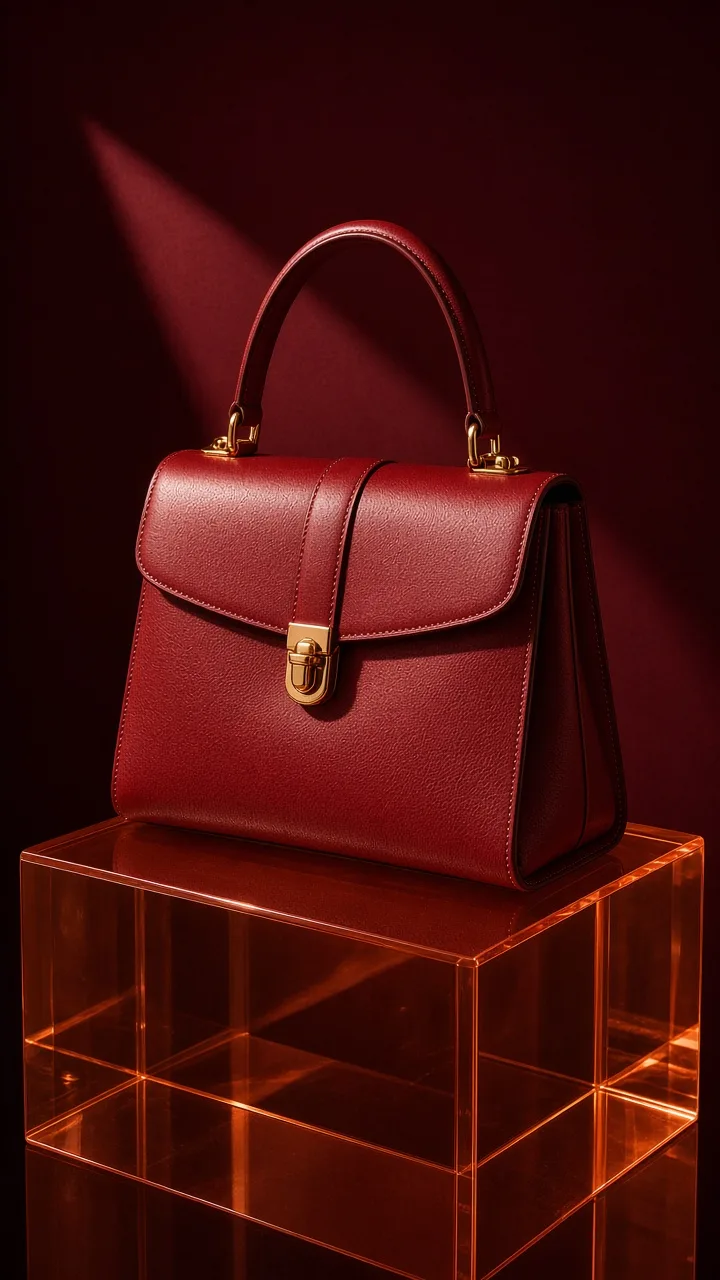
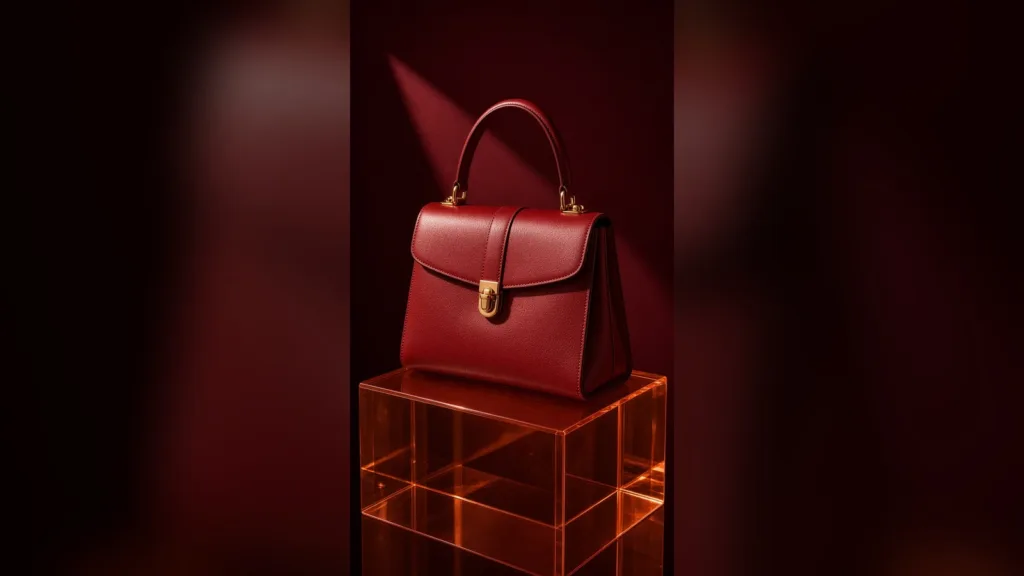
Build this look with a wine-red background, an orange-amber block, and a burgundy product. Aim a soft light from one side and slightly behind the product so the pedestal glows at its upper edge. Keep the opposite side dark enough to preserve the outline.
Copyable prompt: vertical editorial product scene, burgundy leather handbag centered on a translucent amber acrylic pedestal, deep oxblood seamless background, one soft side light, subtle reflection, generous clean space, realistic materials, no text, no logo.
Turn the product a few degrees instead of pointing its front directly into the light. That small angle can control glare while keeping a crisp highlight along the shape.
2. Hard-light acrylic shadow
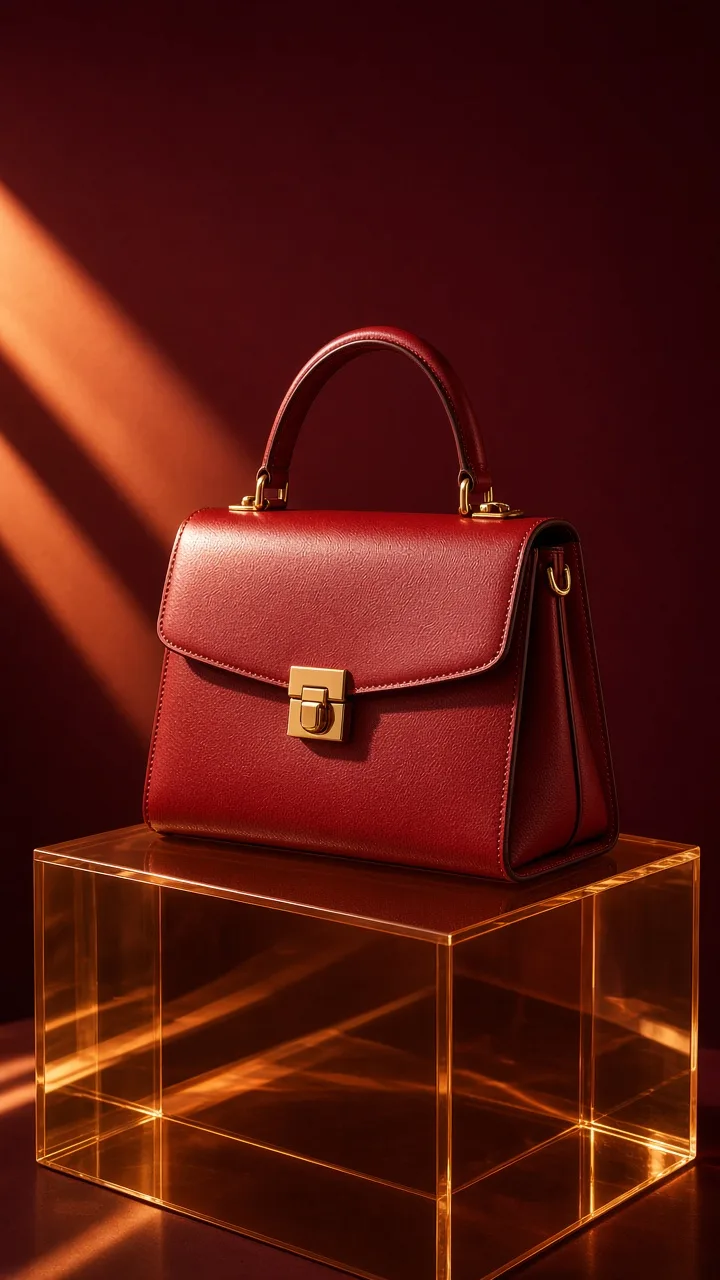
Use one small, direct light to cast a long shadow from the product and the pedestal. A bare lamp, focused LED, or sunlight through a narrow gap can work. Remove textured props: the shadow is already the supporting graphic element.
Copyable prompt: vertical studio product photograph, clear fragrance bottle on a thick amber acrylic cube, hard light from camera left, long clean shadow, dark brown paper backdrop, realistic glass, minimal editorial composition, no text.
Place the item slightly behind the pedestal’s front edge. The extra surface gives its shadow room to stretch into view rather than disappearing behind the product.
3. Tonal beauty still life
Choose honey amber for peach, coral, or nude packaging. Add only one secondary shape—a curved paper strip, a small stone, or an unbranded cap—in a shade already present on the product. Frame tightly so a thin lipstick or serum bottle does not become tiny on a phone screen.
Copyable prompt: close vertical beauty still life, coral lipstick on a translucent honey-amber pedestal, one curved coral paper shape behind it, warm peach gradient, soft overhead light, refined shadows, realistic product proportions, no text.
This direction is gentler than hard-light acrylic. Use it when the product story is about shade, texture, or a seasonal color collection rather than technical performance.
4. Floating product reveal
Show the item hovering just above the pedestal, with a narrow contact shadow anchoring it. For motion, begin on the empty block, lower the product into place, and finish with a slow push-in or a short orbit. The small gap suggests lift without turning the scene into fantasy.
Copyable prompt: vertical ecommerce hero scene, compact wireless earbuds hovering just above a translucent burnt-orange pedestal, controlled studio light, soft contact shadow, realistic polished metal, restrained premium composition, no text.
Keep the move simple. One descent plus one camera move is enough for a reveal; a rapid spin, zoom, and light sweep in the same shot can hide the product shape.
How do you shoot an amber pedestal effect on a phone?
Shoot it by locking the phone, controlling one light direction, and exposing for the brightest edge of the pedestal. You do not need a large studio. A tabletop, colored paper, a translucent acrylic block, and a lamp with diffusion can create the base frame.
- Clean the product and lens. Dust becomes obvious on glossy acrylic and glass.
- Build the background. Curve paper behind the table to avoid a visible horizon line.
- Place the pedestal. Leave space around its edges so the glow and shadow can be seen.
- Set one key light. Start at roughly 45 degrees to the side; move behind the block for more transmitted glow.
- Lock focus and exposure. Lower exposure until bright edges retain detail.
- Record three steady clips. Capture a static hold, a slow push, and a side-to-side move, then choose the cleanest one.
According to TikTok for Business (2026), 9:16 is the recommended vertical dimension for non-Spark in-feed ads, with at least 540 × 960 pixels. Compose vertically from the start, but keep the product near the center so you can also make a square crop.
According to YouTube Help (2024), square or vertical videos uploaded on or after October 15, 2024 can be categorized as Shorts when they are up to three minutes long. Your product reveal can be much shorter, but the rule confirms that both square and vertical versions fit the Shorts format.
If you prefer to build the scene from a product photo, you can turn a product photo into a short product ad in Prodvid, our iOS app, then inspect the generated frame for package accuracy, believable shadows, clean edges, and brand consistency before publishing.
Copyable amber pedestal production checklist
- Use one product with a clean, readable silhouette.
- Choose honey, burnt orange, or red amber—not all three.
- Limit the palette to two main colors plus one neutral.
- Choose either soft editorial light or hard graphic light.
- Keep labels and product details accurate and legible.
- Include a contact shadow for any hovering object.
- Check the opening frame at small phone-screen size.
- Export one vertical master and review any square crop separately.
- Remove frames with warped packaging, duplicate objects, or impossible reflections.
If the scene needs more atmosphere after the basic composition works, compare it with these smoke ribbon product effect looks. Add atmosphere only after the product and pedestal are easy to read.
FAQ
What products suit an amber pedestal effect?
Compact products with distinct outlines suit it best. Fragrance bottles, skincare jars, lipstick, jewelry boxes, small bags, candles, and electronics all give the pedestal room to remain visible. Busy printed apparel and very large objects are harder because they cover the glowing surface and compete with the tight color palette.
Can you make an amber pedestal without acrylic?
Yes. Use translucent amber plastic, colored glass, or a clear block lit through orange gel. For a no-prop version, photograph the product cleanly and build the pedestal digitally. Whatever the method, preserve a believable contact point, edge highlight, and shadow direction so the item does not look pasted on.
Should the light be hard or soft?
Choose one based on the message. Soft light makes beauty, fragrance, and leather scenes feel calm and tactile; hard light creates sharper shadows for tech, jewelry, and graphic launches. Test both, but do not mix several competing light directions in the final frame because the translucent block will expose inconsistencies.
How long should an amber pedestal product reveal be?
A concise reveal can show the empty pedestal, the product arrival, and one finishing camera move in a few seconds. Let readability set the duration: the viewer needs enough time to identify the item and notice one key detail. Cut decorative motion that does not clarify the product or advance the story.
Key takeaways
- An amber pedestal adds warm color, material contrast, and visual weight without a crowded set.
- Use one amber shade, one light direction, and one restrained movement.
- Preserve believable contact shadows, accurate packaging, and a readable silhouette.
- Shoot vertically first, then verify each alternate crop rather than assuming it works.
- Hard light feels graphic; soft light feels calm and tactile.
Sources
- TikTok for Business: TikTok Auction In-Feed Ads (accessed 2026).
- YouTube Help: Understand three-minute YouTube Shorts (2024 policy date; accessed 2026).